Configure ALCD
ALCD can be configured using several configuration files
global_parameterswhich contains the parameters for the various algorithms usedpaths_parameterswhich mainly contains paths to datamodel_parameterswhich contains the learning parameters
global_parameters
A granule is defined as a set of data specified in space and time, i.e. a location and a date. For example, a granule could be associated with Orleans, tile 31UDP, and the 13 th of April 2018. In all the environment, a date is in format YYYYMMDD (the previous date becoming 20180413).
classification: classification parametersmethod: which method is used among : rf_otb, svm_otb, boost_otb, dt_otb, gbt_otb, knn_otb, rf_scikit, svm_scikit, ada_scikit, xtree_scikit, grad_scikit, hist_grad_scikit. More information can be found in the Notebook Tutorial.
general: output names for the files. Not necessary to change anything. The different files will be referred to with their default names afterwardslocal_paths: specific to your environment. It is used if you run the ALCD on a distant machine, and want to modify the masks on your local machine with QGIS. Useful if the distant machine does not have a graphic card.copy_folder: on your local machine, where you want to edit the filescurrent_server: the adress of the distant machine
masks: naming and attribution of a number to each classpostprocessing: global naming for post-processing filesautomatically_generated: references to the specific case you are working on. This will be modified when running ALCD, so you do not need (and should not) change it manuallytraining_parameters: parameters used for the training and classification of the algorithm. The default ones are good, but you can change them.training_proportion: the proportion of samples that will become training sam- ples (between 0 and 1). The other part (1-training_proportion) will become validating samples.expansion_distance: in meters, the size of the buffer zone around each sample. This buffer zone will be used to augment the data, i.e. take the neighboring pixelsregularization_radius: in pixels (should be an integer), the radius for the regu- larization of the classification map. Typical values are between 1 and 5.dilatation_radius: in pixels (should be an integer), the radius for the dilatation of the contours for the visualisation. Typical values are between 1 and 5.Kfold: for the K-fold cross-validation, which k to use (usually 5 or 10).
features: which features will be used for the classification.original_bands: list of the bands from the cloudy date to use. It is recommended to use all of them.time_difference_bands: list of the bands from which the difference will be made, between the cloudy and clear date. It is recommended to use all of them apart the band 10, which is noisy.special_indices: list of peculiar indices. Can be composed of NDVI, NDWI, NDSI for the moment.ratios: list of ratios. Each item should have the format “a_b”, where a and b are bands numbers (e.g. “2_4” will produce the ratio B2/B4).DTM: boolean, whether you want to use the Digital Elevation Model or not.textures: boolean, whether you want to create the two texture features (coefficient of variation and contours density are available for the moment).
user_choices: Data locationuser_module: path to the Python file containing the user’s process, if wanted. For more information, see the Notebook Tutorial.user_function: name of the feature to apply, if wanted. For more information, see the Notebook Tutorial.clear_date: date of the non-cloudy imagecurrent_date: date of the cloudy imagelocation: location foldermain_dir: main directory to store the resultsraw_img: .tif image used for the trainingtile: Tile reference
paths_parameters
global_chains_paths: contains the main paths concerning the output of the processing chainsL1C: the L1C products, subsequently designated as L1C product root dirmaja: directory where the MAJA files are, subsequently designated as MAJA output root dirsen2cor: directory where the Sen2cor files are, subsequently designated as Sen2cor output root dirfmask: directory where the Fmask files are, subsequently designated as Fmask output root dirDTM_input: directory where the Digital Terrain Model files are, subsequently desig- nated as DTM product root dirDTM_resized: directory where the resized Digital Terrain Model files will be stored
data_paths: in case the Data_ALCD and Data_PCC are moved or renamed, this should be modifiedtile_location: specification of the tile code linked to a named place. You could add other locations here.
model_parameters
Parameters are directly referring to the OTB or Scikit-learn ones. You can therefore see the OTB documentation or the Scikit-learn documentation for this purpose, depending on the choosen classification algorithm.
Input data organisation
The data organisation of each of the programs outputs is defined below, with the example of
Arles on the 2 nd of October, 2017. If your structure is different, you need to change
some variables in the code. For each directory or file, the pattern to describe it follows the
syntax: “General name : ExampleForArles”. The * in a path indicates that the path has been
truncated at this place.
L1C product structure
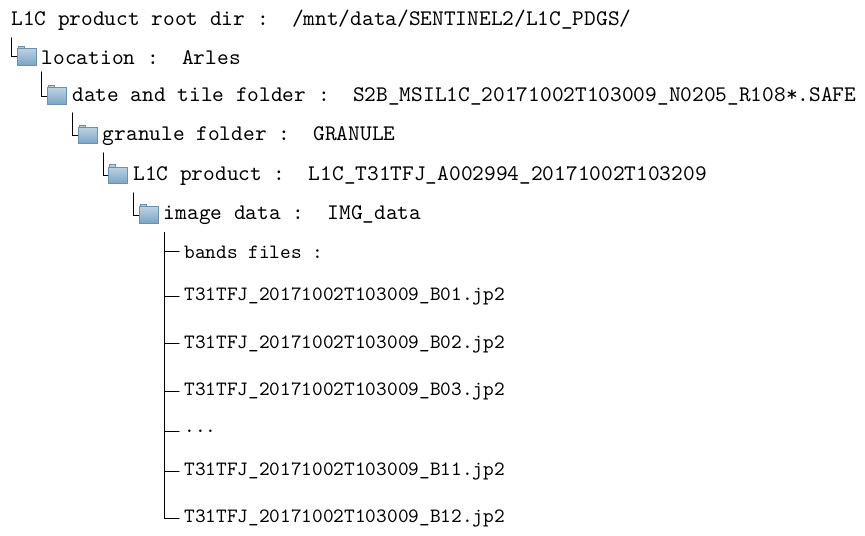
The full path of the first band is therefore, in this example: /mnt/data/SENTINEL2/L1C_ PDGS/Arles/S2B_MSIL1C_20171002T103009_N0205_R108_T31TFJ_20171002T103209.SAFE/ GRANULE/L1C_T31TFJ_A002994_20171002T103209/IMG_DATA/T31TFJ_20171002T103009_ B01.jp2
DTM product structure
The Digital Terrain Model is specific to a tile. Therefore, there is no need to have a copy of the DTM for each date. The original DTM should be placed in the DTM_input directory. After the first time the ALCD is run on one location, its resized DTM will be created in the DTM_resized directory, so as to avoid generating it each time. The format has to be an unpacked DTM folder (.DBL).
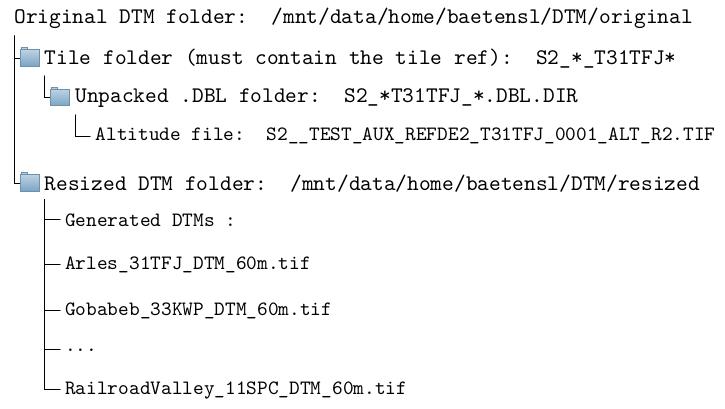
The full path of the original DTM is therefore, in this example: /mnt/data/home/ baetensl/DTM/original/S2__TEST_AUX_REFDE2_Arles_T31TFJ_0002/S2__TEST_AUX_REFDE2_ T31TFJ_0001.DBL.DIR/S2__TEST_AUX_REFDE2_T31TFJ_0001_ALT_R2.TIF. After the ALCD
is run once on Arles, the resized DTM will be in /mnt/data/home/baetensl/DTM/resized/ Arles_31TFJ_DTM_60m.tif.